3 Data Exploration
Learning Objectives
- Load data from CSV, Excel, and Stata formats
- Understand dataset structure before any analysis
- Build a comprehensive "First Analysis" script
- Explore distributions, ranges, and correlations
I witnessed many students—(and occasionally also senior researchers...)—make a costly mistake: jumping straight into analysis without first getting to know their data.
The consequences: running regressions on variables with 80% missing values, drawing conclusions from data entry errors, missing obvious patterns, etc. In this module I'll share a more disciplined approach.
The Data Exploration Workflow
Import data
Structure & types
Distributions
Patterns
Relationships
Step 1: Loading Data
What is "Loading Data"?
Loading data means reading information from a file into your program's memory. The file stays unchanged—you create a working copy. Different formats (CSV, Excel, Stata) require different commands.
For our research project, we'll use World Bank development indicators. Click Run to see the output for each language:
# COMPLETE EXAMPLE: Load World Bank data directly from URL
# This demonstrates loading CSV data from the internet

# Import pandas - the main data manipulation library in Python
import pandas as pd

# World Bank provides CSV downloads - we use GDP data
# This URL points to a publicly available dataset on GitHub
url = "https://raw.githubusercontent.com/datasets/gdp/master/data/gdp.csv"

# read_csv() loads CSV data into a DataFrame
# It automatically detects column names and data types
df = pd.read_csv(url)

# Verify the load worked by checking dimensions
# len(df) returns number of rows, len(df.columns) returns number of columns
print(f"Loaded {len(df):,} rows and {len(df.columns)} columns")
print(f"Columns: {list(df.columns)}")* COMPLETE EXAMPLE: Load World Bank data
* Stata can import CSV files directly from URLs
* Clear any existing data from memory
clear all
* Import CSV file from URL into Stata
* 'delimited' means comma-separated values
* 'clear' option replaces any data in memory
import delimited "https://raw.githubusercontent.com/datasets/gdp/master/data/gdp.csv", clear
* Verify the load - describe shows variable info
* 'short' option gives a compact summary
describe, short
* List first 5 observations to preview the data
list in 1/5# COMPLETE EXAMPLE: Load World Bank data directly from URL
# R can read CSV files from URLs natively
# Load tidyverse - a collection of R packages for data science
# Includes readr (for reading data), dplyr (for manipulation), ggplot2 (for visualization)
library(tidyverse)
# Define the URL pointing to our CSV data
url <- "https://raw.githubusercontent.com/datasets/gdp/master/data/gdp.csv"
# read_csv() from readr package loads the data into a tibble
# A tibble is a modern version of R's data.frame
df <- read_csv(url)
# Print dimensions and column names
# nrow() = number of rows, ncol() = number of columns
cat(sprintf("Loaded %s rows and %d columns\n",
format(nrow(df), big.mark=","), ncol(df)))
print(names(df))Step 2: Inspecting Structure
Before analyzing data, we need to understand its structure: what variables exist, their types, and any missing values. Knowing the data structure will prevent many mistakes!
# Continuing from above - inspect the data structure
# This is crucial before any analysis!

# info() shows data types and non-null counts for each column
# This reveals missing values and helps identify type issues
print("=== DATA STRUCTURE ===")
print(df.info())

# head() shows first rows - always visually inspect!
# Default is 5 rows, but you can specify: head(10)
print("\n=== FIRST 5 ROWS ===")
print(df.head())* Continuing - inspect structure
* Always check your data before analysis!
* Full variable description including type, format, labels
describe
* First observations - visual inspection is crucial
list in 1/5# Continuing - inspect structure
# Understanding structure prevents analysis mistakes
# str() shows structure: variable types, sample values
# This is R's equivalent of pandas info()
str(df)
# head() shows first 6 rows by default
head(df)Step 3: Summary Statistics
Now we calculate key statistics to understand our data's distribution and identify potential issues.
# Summary statistics - understand your distributions

# describe() gives count, mean, std, min, 25%, 50%, 75%, max
# Only works on numeric columns by default
print("=== SUMMARY STATISTICS ===")
print(df.describe())

# Missing values analysis - CRITICAL for research!
# isnull() returns True/False, sum() counts True values
print("\n=== MISSING VALUES ===")
missing = df.isnull().sum()
missing_pct = (missing / len(df) * 100).round(1)
print(pd.DataFrame({'Missing': missing, 'Percent': missing_pct}))* Summary statistics
* 'detail' option gives more info: percentiles, skewness, kurtosis
summarize, detail
* Missing values analysis
* misstable shows patterns of missing data
misstable summarize# Summary statistics
# summary() gives min, 1st quartile, median, mean, 3rd quartile, max
summary(df)
# Missing values count per column
# is.na() returns TRUE/FALSE, colSums() sums each column
cat("\nMissing values:\n")
colSums(is.na(df))25% of GDP values are missing. Before any analysis, we need to understand why. Are they missing for small countries? Recent years? This is exactly what the "First Analysis" approach catches early.
Cross-Tabulations and Group-Level Statistics
We found 25% of GDP values are missing—but where are they concentrated? Cross-tabulations let us investigate patterns across groups (here, across decades) and compute group-level summaries. In other contexts, the same tools let you compare treated vs. control groups, callback rates by race, or outcomes across regions. These are essential for descriptive analysis before running any regression.
# Python: Cross-tabulations and group statistics
# Continuing from above - df is our World Bank GDP data

# Create useful grouping variables from existing data
df['Decade'] = (df['Year'] // 10) * 10
df['has_gdp'] = df['Value'].notna().astype(int)

# Two-way frequency table: data availability by decade
freq_table = pd.crosstab(df['Decade'], df['has_gdp'], margins=True)
print(freq_table)

# Row proportions (share of countries with GDP data per decade)
prop_table = pd.crosstab(df['Decade'], df['has_gdp'], normalize='index')
print(prop_table)

# Group-level summary statistics: GDP by decade
group_stats = df.groupby('Decade')['Value'].agg(
    ['mean', 'std', 'count']
)
print(group_stats)* Stata: Cross-tabulations and group statistics
* Continuing from above - GDP data is already loaded
* Create useful grouping variables
gen decade = int(year/10)*10
gen has_gdp = !missing(value)
* Two-way frequency table: data availability by decade
tab decade has_gdp
* With row and column percentages
tab decade has_gdp, row col
* Group-level summary statistics: GDP by decade
tabstat value, by(decade) stat(mean sd count)
* Detailed summary by group
bysort decade: summarize value, detail
* Table with chi-squared test
tab decade has_gdp, chi2# R: Cross-tabulations and group statistics
# Continuing from above - df is our World Bank GDP data
# Create useful grouping variables
df$Decade <- (df$Year %/% 10) * 10
df$has_gdp <- as.integer(!is.na(df$Value))
# Two-way frequency table: data availability by decade
freq_table <- table(df$Decade, df$has_gdp)
addmargins(freq_table)
# Row proportions (share with GDP data per decade)
prop.table(table(df$Decade, df$has_gdp), margin = 1)
# Group means using aggregate
aggregate(Value ~ Decade, data = df, FUN = mean)
# Tidyverse approach: group_by + summarise
df %>%
group_by(Decade) %>%
summarise(
mean_gdp = mean(Value, na.rm = TRUE),
sd_gdp = sd(Value, na.rm = TRUE),
n = n(),
pct_available = mean(!is.na(Value)) * 100
)
Cross-tabulations are particularly useful for spotting patterns in data availability (as we did here with missing GDP values), checking balance between treatment and control groups, computing relative frequencies (e.g., callback rates by race in audit studies), and creating summary tables for papers. For continuous outcomes, use aggregate() (R), tabstat (Stata), or groupby().agg() (Python).
Advanced GroupBy: Multi-Index Results and Group Transformations
When you group by two or more columns, the result has a multi-level index (also called a hierarchical index). Understanding how to navigate this structure is essential for panel data analysis.
Multi-Index GroupBy Results
Grouping by two columns (e.g., country and sector) produces a multi-level index where the first grouping variable is the outer level and the second is the inner level. You can use .loc[] to select a slice of the outer level.
# Grouping by two columns creates a multi-level index
result = df.groupby(['country', 'sector'])['employment'].sum()

# result is a Series with a multi-level index:
#   country   sector
#   France    Agriculture    150000
#             Industry       820000
#             Services      1500000
#   Germany   Agriculture    120000
#             ...

# Use .loc[] on the outer level to get one country's breakdown
france_sectors = result.loc['France']
# Returns a Series indexed by sector:
#   Agriculture     150000
#   Industry        820000
#   Services       1500000

# To flatten back to a regular DataFrame:
result_flat = result.reset_index()
* Stata: Grouped summaries do not create multi-level indices
* Instead, use collapse or table with multiple by-variables
* Option 1: collapse (replaces data in memory)
collapse (sum) employment, by(country sector)
list if country == "France"
* Option 2: table (displays without modifying data)
table country sector, statistic(sum employment)# R: Grouped summaries produce a regular tibble, not a multi-index
result <- df %>%
group_by(country, sector) %>%
summarise(total_emp = sum(employment, na.rm = TRUE), .groups = "drop")
# Filter to one country
france_sectors <- result %>% filter(country == "France")Group Transformations: Adding Group Statistics Without Collapsing
Sometimes you want to add a group-level statistic (like the group mean) as a new column to every row, without collapsing the data. This is different from groupby().mean() or collapse, which reduce each group to a single row.
# transform() adds a group statistic to every row WITHOUT collapsing
df['group_mean_income'] = df.groupby('region')['income'].transform('mean')

# Now each row has a new column with its region's average income
# Useful for computing deviations from group means:
df['income_deviation'] = df['income'] - df['group_mean_income']
* egen with bysort: adds group stats without collapsing
bysort region: egen group_mean_income = mean(income)
* Now compute deviations from the group mean
gen income_deviation = income - group_mean_income# mutate() with group_by() adds group stats without collapsing
df <- df %>%
group_by(region) %>%
mutate(group_mean_income = mean(income, na.rm = TRUE)) %>%
ungroup()
# Compute deviations from the group mean
df <- df %>% mutate(income_deviation = income - group_mean_income)Key distinction: groupby().mean() / collapse / summarise() reduce each group to one row. transform() / bysort: egen / mutate() with group_by() preserve every row and add a new column. This is critical for computing within-group deviations, demeaning panel data, or adding group-level controls to individual observations.
Step 4-5: Visualization & Correlations
Visual inspection reveals patterns that summary statistics may miss. I personally like to have code produce figures files rather than just displaying them inline. This also makes them easy to include in reports for coauthors, as well as later in papers and presentations. As usual, go with your mouse over the code below to inspect the commands that save the files (the code underlined with dashed line).
# Import visualization libraries
import matplotlib.pyplot as plt
import seaborn as sns
import numpy as np
import os

# Create output directory for figures
os.makedirs('figures', exist_ok=True)

# Prepare data
df_viz = df.copy()
df_viz['GDP_billions'] = df_viz['Value'] / 1e9
df_viz['log_GDP'] = np.log10(df_viz['Value'].replace(0, np.nan))
df_viz['Decade'] = (df_viz['Year'] // 10) * 10

# ─────────────────────────────────────────────────────────────
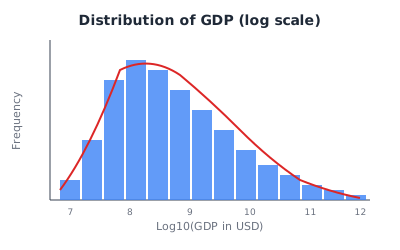
# FIGURE 1: Distribution of GDP (histogram + density)
# ─────────────────────────────────────────────────────────────
fig, ax = plt.subplots(figsize=(8, 5))
sns.histplot(df_viz['log_GDP'].dropna(), kde=True, bins=40, ax=ax)
ax.set_xlabel('Log10(GDP in USD)')
ax.set_ylabel('Frequency')
ax.set_title('Distribution of GDP (log scale)')
fig.savefig('figures/01_gdp_distribution.png', dpi=300, bbox_inches='tight')
plt.close()
print("Saved: figures/01_gdp_distribution.png")

# ─────────────────────────────────────────────────────────────
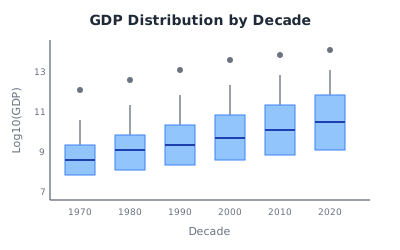
# FIGURE 2: Box plot by decade
# ─────────────────────────────────────────────────────────────
fig, ax = plt.subplots(figsize=(10, 5))
sns.boxplot(data=df_viz, x='Decade', y='log_GDP', ax=ax)
ax.set_ylabel('Log10(GDP)')
ax.set_title('GDP Distribution by Decade')
ax.tick_params(axis='x', rotation=45)
fig.savefig('figures/02_gdp_boxplot_decades.png', dpi=300, bbox_inches='tight')
plt.close()
print("Saved: figures/02_gdp_boxplot_decades.png")

# ─────────────────────────────────────────────────────────────
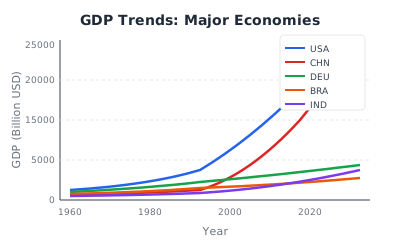
# FIGURE 3: Time series for major economies
# ─────────────────────────────────────────────────────────────
fig, ax = plt.subplots(figsize=(10, 6))
countries = ['USA', 'CHN', 'DEU', 'BRA', 'IND']
for country in countries:
    data = df_viz[df_viz['Country Code'] == country]
    ax.plot(data['Year'], data['GDP_billions'], label=country, linewidth=2)
ax.set_xlabel('Year')
ax.set_ylabel('GDP (Billion USD)')
ax.set_title('GDP Trends: Major Economies')
ax.legend()
ax.grid(True, alpha=0.3)
fig.savefig('figures/03_gdp_trends.png', dpi=300, bbox_inches='tight')
fig.savefig('figures/03_gdp_trends.pdf', bbox_inches='tight')
plt.close()
print("Saved: figures/03_gdp_trends.png and .pdf")

# ─────────────────────────────────────────────────────────────
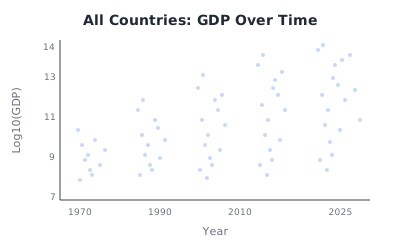
# FIGURE 4: Scatter plot - all countries over time
# ─────────────────────────────────────────────────────────────
fig, ax = plt.subplots(figsize=(10, 6))
sns.scatterplot(data=df_viz.dropna(), x='Year', y='log_GDP', alpha=0.3, s=15, ax=ax)
ax.set_ylabel('Log10(GDP)')
ax.set_title('All Countries: GDP Over Time')
fig.savefig('figures/04_gdp_scatter.png', dpi=300, bbox_inches='tight')
plt.close()
print("Saved: figures/04_gdp_scatter.png")

# ─────────────────────────────────────────────────────────────
# FIGURE 5: Density comparison across decades
# ─────────────────────────────────────────────────────────────
fig, ax = plt.subplots(figsize=(8, 5))
for decade in [1980, 2000, 2020]:
    data = df_viz[(df_viz['Decade'] == decade) & (df_viz['log_GDP'].notna())]
    sns.kdeplot(data['log_GDP'], label=f'{decade}s', linewidth=2, ax=ax)
ax.set_xlabel('Log10(GDP)')
ax.set_ylabel('Density')
ax.set_title('GDP Distribution Shift Over Decades')
ax.legend(title='Decade')
fig.savefig('figures/05_gdp_density_decades.png', dpi=300, bbox_inches='tight')
plt.close()
print("Saved: figures/05_gdp_density_decades.png")

# List all generated figures
print("\n─── All figures saved to ./figures/ ───")
for f in sorted(os.listdir('figures')):
print(f" {f}")* Create output directory for figures
capture mkdir "figures"
* Prepare data
gen gdp_billions = value / 1e9
gen log_gdp = log10(value)
gen decade = int(year/10)*10
* ─────────────────────────────────────────────────────────────
* FIGURE 1: Distribution of GDP (histogram + density)
* ─────────────────────────────────────────────────────────────
histogram log_gdp, kdensity frequency ///
title("Distribution of GDP (log scale)") ///
xtitle("Log10(GDP in USD)")
graph export "figures/01_gdp_distribution.png", replace
* ─────────────────────────────────────────────────────────────
* FIGURE 2: Box plot by decade
* ─────────────────────────────────────────────────────────────
graph box log_gdp, over(decade) ///
title("GDP Distribution by Decade") ///
ytitle("Log10(GDP)")
graph export "figures/02_gdp_boxplot_decades.png", replace
* ─────────────────────────────────────────────────────────────
* FIGURE 3: Time series for major economies
* ─────────────────────────────────────────────────────────────
twoway (line gdp_billions year if countrycode == "USA", lwidth(medium)) ///
(line gdp_billions year if countrycode == "CHN", lwidth(medium)) ///
(line gdp_billions year if countrycode == "DEU", lwidth(medium)) ///
(line gdp_billions year if countrycode == "BRA", lwidth(medium)) ///
(line gdp_billions year if countrycode == "IND", lwidth(medium)), ///
legend(label(1 "USA") label(2 "China") label(3 "Germany") ///
label(4 "Brazil") label(5 "India")) ///
title("GDP Trends: Major Economies") ///
ytitle("GDP (Billion USD)") xtitle("Year")
graph export "figures/03_gdp_trends.png", replace
graph export "figures/03_gdp_trends.pdf", replace
* ─────────────────────────────────────────────────────────────
* FIGURE 4: Scatter plot - all countries over time
* ─────────────────────────────────────────────────────────────
scatter log_gdp year, msize(tiny) mcolor(%30) ///
title("All Countries: GDP Over Time") ///
ytitle("Log10(GDP)") xtitle("Year")
graph export "figures/04_gdp_scatter.png", replace
* ─────────────────────────────────────────────────────────────
* FIGURE 5: Density comparison across decades
* ─────────────────────────────────────────────────────────────
twoway (kdensity log_gdp if decade == 1980, lwidth(medium)) ///
(kdensity log_gdp if decade == 2000, lwidth(medium)) ///
(kdensity log_gdp if decade == 2020, lwidth(medium)), ///
legend(label(1 "1980s") label(2 "2000s") label(3 "2020s")) ///
title("GDP Distribution Shift Over Decades") ///
xtitle("Log10(GDP)") ytitle("Density")
graph export "figures/05_gdp_density_decades.png", replace
* List all generated figures
dir "figures/"# Load required libraries
library(tidyverse)
# Create output directory for figures
dir.create("figures", showWarnings = FALSE)
# Prepare data
df_viz <- df %>%
mutate(
GDP_billions = Value / 1e9,
log_GDP = log10(Value),
Decade = (Year %/% 10) * 10
)
# ─────────────────────────────────────────────────────────────
# FIGURE 1: Distribution of GDP (histogram + density)
# ─────────────────────────────────────────────────────────────
p1 <- ggplot(df_viz, aes(x = log_GDP)) +
geom_histogram(aes(y = after_stat(density)), bins = 40,
fill = "steelblue", alpha = 0.7) +
geom_density(color = "darkred", linewidth = 1) +
labs(x = "Log10(GDP in USD)", y = "Density",
title = "Distribution of GDP (log scale)")
ggsave("figures/01_gdp_distribution.png", p1, width = 8, height = 5, dpi = 300)
cat("Saved: figures/01_gdp_distribution.png\n")
# ─────────────────────────────────────────────────────────────
# FIGURE 2: Box plot by decade
# ─────────────────────────────────────────────────────────────
p2 <- df_viz %>%
filter(!is.na(log_GDP)) %>%
ggplot(aes(x = factor(Decade), y = log_GDP)) +
geom_boxplot(fill = "lightblue", outlier.alpha = 0.3) +
labs(x = "Decade", y = "Log10(GDP)",
title = "GDP Distribution by Decade")
ggsave("figures/02_gdp_boxplot_decades.png", p2, width = 10, height = 5, dpi = 300)
cat("Saved: figures/02_gdp_boxplot_decades.png\n")
# ─────────────────────────────────────────────────────────────
# FIGURE 3: Time series for major economies
# ─────────────────────────────────────────────────────────────
countries <- c("USA", "CHN", "DEU", "BRA", "IND")
p3 <- df_viz %>%
filter(`Country Code` %in% countries) %>%
ggplot(aes(x = Year, y = GDP_billions, color = `Country Code`)) +
geom_line(linewidth = 1.2) +
labs(y = "GDP (Billion USD)", title = "GDP Trends: Major Economies") +
theme(legend.position = "bottom")
ggsave("figures/03_gdp_trends.png", p3, width = 10, height = 6, dpi = 300)
ggsave("figures/03_gdp_trends.pdf", p3, width = 10, height = 6)
cat("Saved: figures/03_gdp_trends.png and .pdf\n")
# ─────────────────────────────────────────────────────────────
# FIGURE 4: Scatter plot - all countries over time
# ─────────────────────────────────────────────────────────────
p4 <- df_viz %>%
filter(!is.na(log_GDP)) %>%
ggplot(aes(x = Year, y = log_GDP)) +
geom_point(alpha = 0.2, size = 0.8) +
labs(y = "Log10(GDP)", title = "All Countries: GDP Over Time")
ggsave("figures/04_gdp_scatter.png", p4, width = 10, height = 6, dpi = 300)
cat("Saved: figures/04_gdp_scatter.png\n")
# ─────────────────────────────────────────────────────────────
# FIGURE 5: Density comparison across decades
# ─────────────────────────────────────────────────────────────
p5 <- df_viz %>%
filter(Decade %in% c(1980, 2000, 2020), !is.na(log_GDP)) %>%
ggplot(aes(x = log_GDP, color = factor(Decade))) +
geom_density(linewidth = 1.2) +
labs(x = "Log10(GDP)", y = "Density", color = "Decade",
title = "GDP Distribution Shift Over Decades")
ggsave("figures/05_gdp_density_decades.png", p5, width = 8, height = 5, dpi = 300)
cat("Saved: figures/05_gdp_density_decades.png\n")
# List all generated figures
cat("\n─── All figures saved to ./figures/ ───\n")
list.files("figures")Saved figure files:
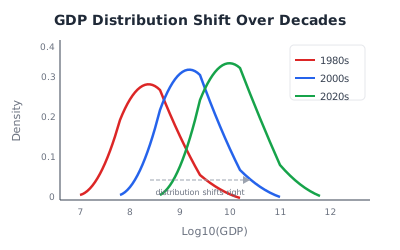
Saved figure files:
Saved figure files:
Step 6: Filtering Rows and Fixing Data Types
Before computing statistics, you often need to filter rows based on conditions and fix data types (e.g., columns that should be numeric but were read as strings). These operations are fundamental to every data exploration workflow.
Boolean Indexing (Filtering Rows by Condition)
In Python, you filter rows by creating a Boolean mask — a Series of True/False values — and passing it inside df[...]. Only rows where the condition is True are kept.
# Python: Boolean indexing
import pandas as pd

# Single condition: keep rows where year is 2020
df_2020 = df[df['year'] == 2020]

# How it works:
#   df['year'] == 2020  creates a Boolean Series (True/False per row)
#   df[...]             keeps only the True rows

# Combining conditions: use & (and) or | (or) with PARENTHESES
high_income = df[(df['region'] == 'North') & (df['income'] > 50000)]

# COMMON BUG: Python's 'and' keyword does NOT work with pandas Series
# df[df['region'] == 'North' and df['income'] > 50000]  # ERROR!
# Use & instead, with parentheses around each condition

# The .query() method is a readable alternative for complex filters
result = df.query('year >= 2010 & income > 0')
* Stata: Filtering with if conditions
* Filter with if (keeps data temporarily for that command)
summarize income if year == 2020
* Combine conditions with & (and) and | (or)
summarize income if region == "North" & income > 50000
* Permanently drop rows
keep if year >= 2010 & income > 0
* Or drop specific rows
drop if income <= 0 | missing(income)# R: Filtering with dplyr::filter()
library(dplyr)
# Single condition
df_2020 <- df %>% filter(year == 2020)
# Combine conditions: comma means AND, | means OR
high_income <- df %>%
filter(region == "North", income > 50000)
# COMMON BUG: | needs a full comparison on each side
# filter(region == 'North' | 'South') # WRONG!
# filter(region == 'North' | region == 'South') # Correct
# Or use %in%:
subset <- df %>%
filter(region %in% c("North", "South"))Fixing Data Types with pd.to_numeric()
When numeric columns are accidentally read as strings (due to commas in 45,000, currency symbols, or stray text), statistical functions like .mean() silently skip them. Always check df.dtypes and convert with pd.to_numeric().
# Python: Fixing data types

# Check column types — look for 'object' where you expect numbers
print(df.dtypes)

# Convert a column to numeric; errors='coerce' turns bad values to NaN
df['income'] = pd.to_numeric(df['income'], errors='coerce')

# Remove commas before converting (common in European/financial data)
df['income'] = df['income'].str.replace(',', '').astype(float)

# Drop rows where key columns are missing after conversion
df = df.dropna(subset=['income'])
* Stata: Fixing data types
* Check variable types
describe
* Convert string to numeric (destring removes non-numeric characters)
destring income, replace force
* Or remove specific characters first
replace income_str = subinstr(income_str, ",", "", .)
destring income_str, gen(income) force
* Drop observations with missing values
drop if missing(income)# R: Fixing data types
# Check column types
str(df)
# Convert character to numeric (non-numeric values become NA)
df$income <- as.numeric(df$income)
# Remove commas first if needed
df$income <- as.numeric(gsub(",", "", df$income))
# Drop rows with missing values in specific columns
df <- df %>% filter(!is.na(income))Complete "First Analysis" Script
Use this script as a guideline to produce one you can run on every new dataset before any analysis:
Click to expand complete script
# ============================================
# FIRST ANALYSIS SCRIPT - You can run something like this on every new dataset!
# ============================================
import pandas as pd
import matplotlib.pyplot as plt

# 1. LOAD DATA - Replace URL with your data source
url = "https://raw.githubusercontent.com/datasets/gdp/master/data/gdp.csv"
df = pd.read_csv(url)

print("="*50)
print("FIRST ANALYSIS REPORT")
print("="*50)

# 2. STRUCTURE - Understand dimensions and types
print(f"\nRows: {len(df):,} | Columns: {len(df.columns)}")
print(f"\nColumn types:\n{df.dtypes}")

# 3. MISSING VALUES - Critical for research quality
print("\n--- MISSING VALUES ---")
missing_pct = (df.isnull().sum() / len(df) * 100).round(1)
print(missing_pct[missing_pct > 0])

# 4. SUMMARY STATISTICS - Understand distributions
print("\n--- SUMMARY STATISTICS ---")
print(df.describe())

# 5. HISTOGRAMS - Visual inspection of all numeric columns
df.select_dtypes(include=['number']).hist(figsize=(12, 6), bins=30)
plt.tight_layout()
plt.savefig('first_analysis_histograms.png')
plt.show()

print("\n" + "="*50)
print("ANALYSIS COMPLETE")
print("="*50)
* ============================================
* FIRST ANALYSIS SCRIPT - You can run something like this on every new dataset!
* ============================================
* 1. LOAD DATA - Replace URL with your data source
clear all
import delimited "https://raw.githubusercontent.com/datasets/gdp/master/data/gdp.csv", clear
display "=================================================="
display "FIRST ANALYSIS REPORT"
display "=================================================="
* 2. STRUCTURE - Understand dimensions and types
describe, short
describe
* 3. MISSING VALUES - Critical for research quality
display "--- MISSING VALUES ---"
misstable summarize
* 4. SUMMARY STATISTICS - Understand distributions
display "--- SUMMARY STATISTICS ---"
summarize
* 5. HISTOGRAMS - Visual inspection of numeric columns
* Stata creates one histogram at a time; loop over numeric variables
ds, has(type numeric)
foreach var in `r(varlist)' {
histogram `var', freq title("Distribution of `var'")
graph export "first_analysis_`var'.png", replace
}
display "=================================================="
display "ANALYSIS COMPLETE"
display "=================================================="# ============================================
# FIRST ANALYSIS SCRIPT - You can run something like this on every new dataset!
# ============================================
library(tidyverse)
# 1. LOAD DATA - Replace URL with your data source
url <- "https://raw.githubusercontent.com/datasets/gdp/master/data/gdp.csv"
df <- read_csv(url)
cat(strrep("=", 50), "\n")
cat("FIRST ANALYSIS REPORT\n")
cat(strrep("=", 50), "\n")
# 2. STRUCTURE - Understand dimensions and types
cat(sprintf("\nRows: %s | Columns: %d\n", format(nrow(df), big.mark=","), ncol(df)))
cat("\nColumn types:\n")
str(df)
# 3. MISSING VALUES - Critical for research quality
cat("\n--- MISSING VALUES ---\n")
missing_pct <- round(colSums(is.na(df)) / nrow(df) * 100, 1)
print(missing_pct[missing_pct > 0])
# 4. SUMMARY STATISTICS - Understand distributions
cat("\n--- SUMMARY STATISTICS ---\n")
summary(df)
# 5. HISTOGRAMS - Visual inspection of all numeric columns
numeric_df <- df %>% select_if(is.numeric)
numeric_long <- numeric_df %>% pivot_longer(cols = everything(), names_to = "variable", values_to = "value")
p <- ggplot(numeric_long, aes(x = value)) +
geom_histogram(bins = 30, fill = "steelblue", color = "white") +
facet_wrap(~variable, scales = "free") +
theme_minimal() +
labs(title = "Distribution of Numeric Variables")
ggsave("first_analysis_histograms.png", p, width = 12, height = 6)
print(p)
cat("\n", strrep("=", 50), "\n")
cat("ANALYSIS COMPLETE\n")
cat(strrep("=", 50), "\n")